
Turning Monitoring Emails into AI-Assisted Incident Reports

Monitoring inboxes fill up quickly. A server sends repeated notifications, a generic network alert appears many times, a recovery row arrives after a short automatic recovery, and a high-severity issue may be hidden among the noise. This article describes a small but practical automation: read monitoring emails from a Gmail label, classify incident events, ask AI for an operational opinion only when needed, and send both short Telegram alerts and detailed email reports. The sensitive keys are intentionally omitted, but the actual build order is included so the reader can see where to start.
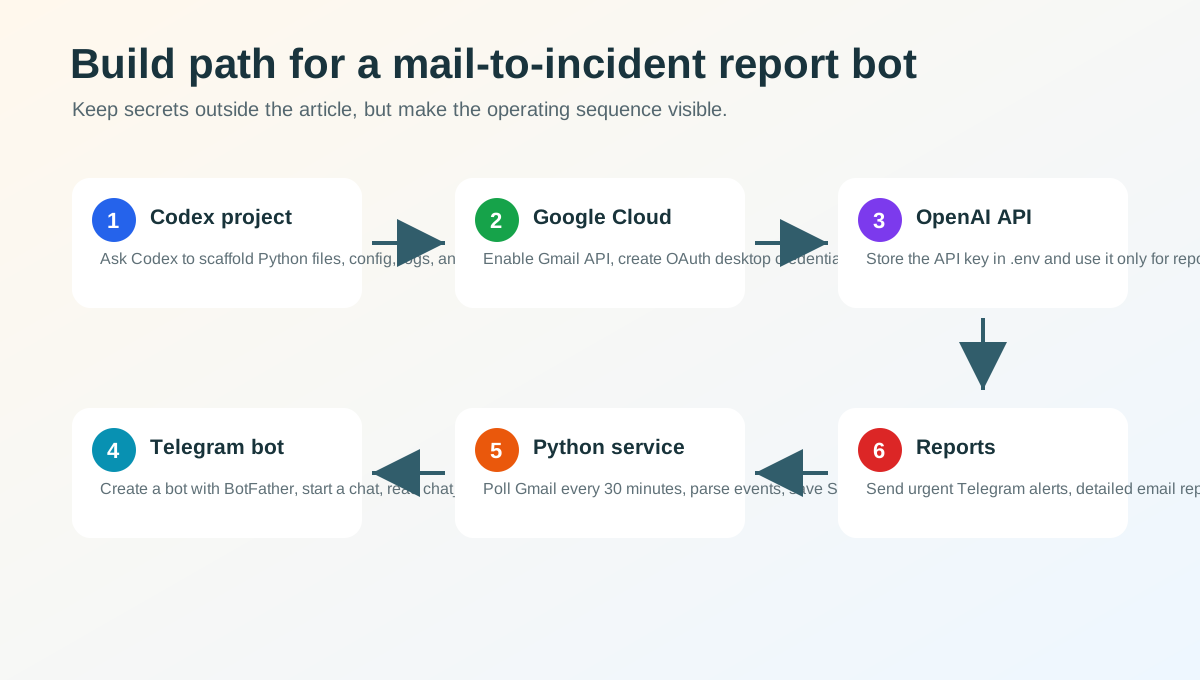
The build sequence
This system does not need to start as a large platform. It can begin as a small Python project generated with Codex, then connected to Google, OpenAI, and Telegram, and finally installed as a background service on your own server.
- Create the Codex project. Ask Codex to scaffold a Python service that reads one Gmail label, parses monitoring emails, classifies incident events, sends Telegram alerts, and sends email reports. Include configuration files, logs, SQLite storage, and a systemd service file from the beginning.
- Prepare Gmail API in Google Cloud. In Google Cloud Console, create a project, enable Gmail API, configure the OAuth consent screen, and create an OAuth client ID as a desktop app. The app needs enough Gmail permission to read messages, send reports, apply labels, and move processed source messages to trash. If the app is still in testing, add the real Gmail address as a test user.
- Authorize the mailbox once. Store the downloaded client JSON file on the server, outside public web paths. On the first run, open the OAuth URL, approve with the Gmail account, and let the program create a token file. After that, the service can read only the selected monitoring label.
- Connect OpenAI API through environment variables. Create an API key in the OpenAI platform and store it in
.env. Do not hard-code it. To control cost, send only reportable incident groups to the AI model, not every raw email. - Create a Telegram bot with BotFather. In Telegram, open BotFather, run
/newbot, then search for the created bot and send/start. Call Telegram'sgetUpdatesendpoint from the server to find thechat_id. Store the bot token and chat_id in.env. - Run the Python service on the server. Create a virtual environment, install dependencies, and register the service with systemd. Every 30 minutes it searches the Gmail label, skips already processed message IDs, saves parsed events to SQLite, moves processed source mail to trash, and sends reports when the rules say it should.
- Split urgent alerts and archived reports. Telegram should carry short immediate alerts. Email should carry the detailed report that can be kept as an operations record. Morning, 18:00, and daily reports can be summarized in Telegram and stored in full by email.
A practical project layout
Keep code, secrets, OAuth files, runtime data, and logs separate. A small server project can look like this:
monitor-mail-reporter/
  src/
    main.py
    gmail_client.py
    parser.py
    reporter.py
    openai_client.py
    telegram_client.py
    storage.py
  config.yaml
  .env
  credentials.json
  token.json
  monitor.db
  logs/
  monitor-mail-reporter.service
config.yaml contains operational rules such as label name, polling interval, severity threshold, and repetition count. .env contains secrets such as OpenAI API key, Telegram bot token, chat_id, and report recipient. SQLite keeps processed message IDs and parsed event rows, so source mail can be moved to trash without losing morning or daily report data.
What the Python service actually does
The service first searches Gmail with a narrow query such as a specific label and recent time window. It checks whether each Gmail message ID has already been processed. New messages are converted from HTML into text, then parsed into timestamp, host, status, incident name, and severity.
The parsed events are saved before any source message is moved to trash. Then the rule engine decides whether the group needs an immediate report, should be accumulated for a scheduled report, or should be treated as recovery noise. When a group is reportable, the AI model receives structured events and writes an operational opinion: what may be important, which host or layer is repeating, and what a human should check first.
Finally, Telegram receives a short alert and email receives the detailed report. Sent reports can also be labeled in Gmail so later reviews are easy.
Why classification comes before AI
It is tempting to send every new email directly to an AI model and ask for a summary. Monitoring email is different from normal email. A low-level alert may matter only when it repeats. A RECOVERY row may simply mean a 30-second automatic recovery. If the system treats every line as equally urgent, the alert channel becomes noisy and people stop trusting it.
- Extract time, host, status, incident name, and severity from each email.
- Separate
PROBLEMrows fromRECOVERYrows. - Classify severity only by the standard Zabbix severity names: Not classified, Information, Warning, Average, High, and Disaster.
- Report low-severity events such as Information or Warning only when they repeat enough times.
- Move source emails to trash only after events are stored in the database.
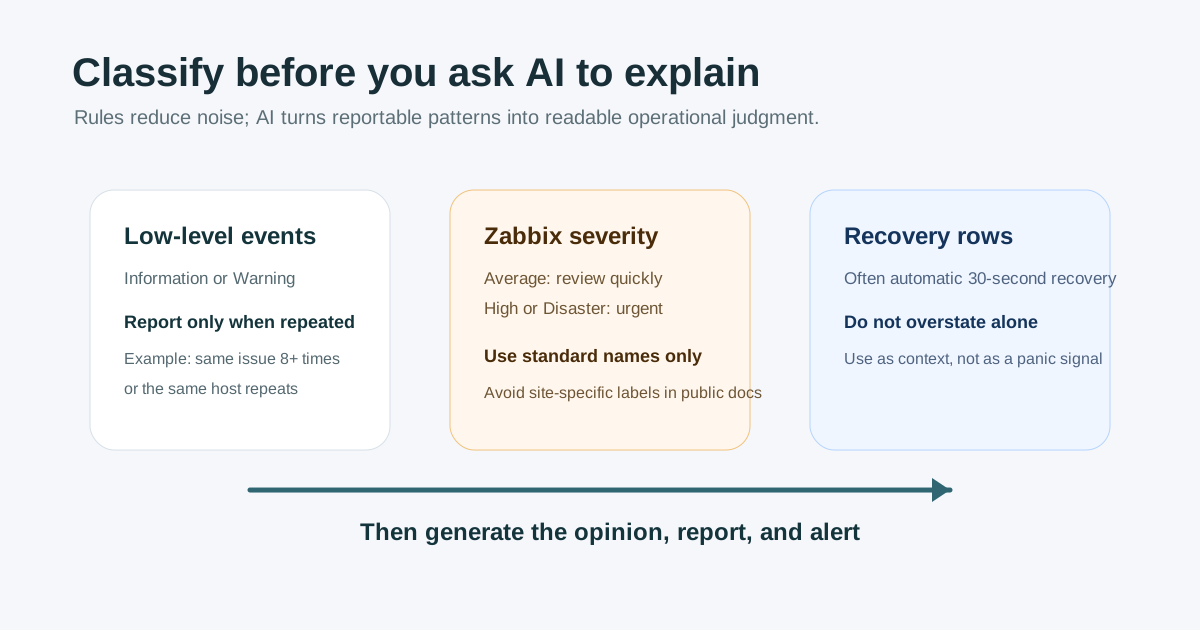
The overall architecture
The implementation can stay small. The server checks recent messages through the API in one Gmail label, skips already processed messages, parses new events, stores them in SQLite, and then decides whether to report immediately or just archive the event for the next scheduled report.
| Step | Purpose | Practical note |
|---|---|---|
| Gmail collection | Read only recent messages under one label | Keep the search scope narrow. |
| Event parsing | Extract status, host, incident, and severity | Convert HTML mail into plain text first. |
| Rule decision | Separate immediate, accumulated, and ignored cases | Use repetition thresholds for low severity. |
| AI opinion | Write risk and next-check guidance | Call AI only for reportable situations. |
| Reporting | Send Telegram summaries and email details | Separate interruption from archiving. |
Why split Telegram and email
Telegram is good for short interruptions. Email is better for detailed reports and long-term storage. Mixing those roles makes both channels worse. The automation therefore sends immediate incidents as short Telegram messages and sends the full report by email. Morning, 18:00, and daily reports are summarized in Telegram, while the detailed version is kept in email.
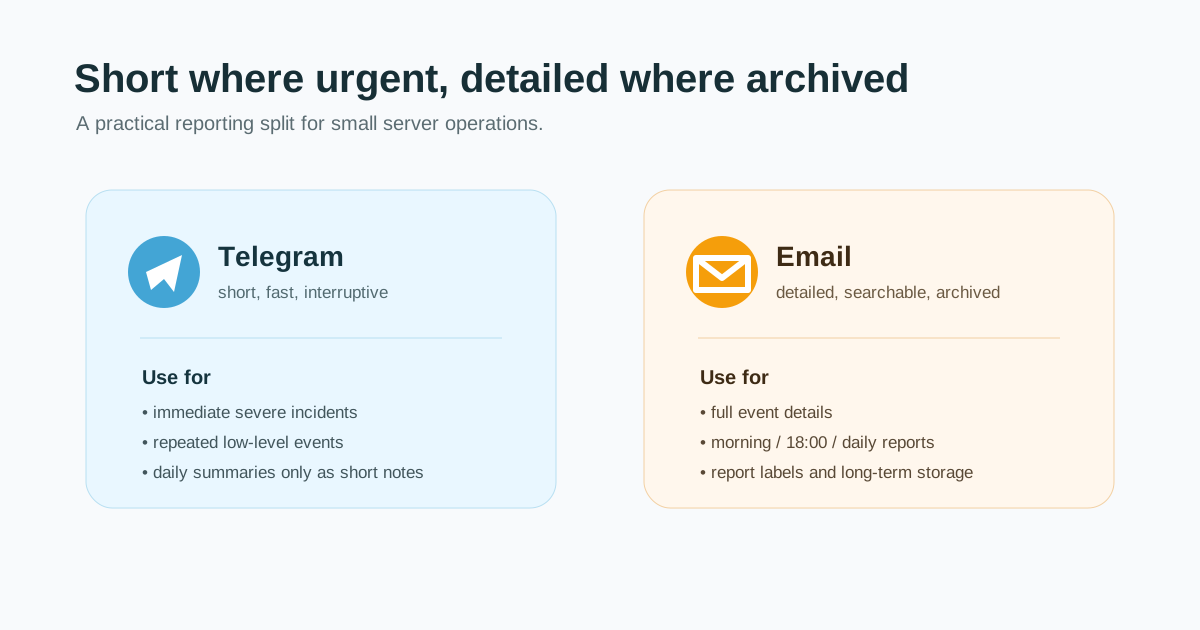
The reporting rules
The hardest part is deciding when to report. If the system is too sensitive, it becomes noise. If it is too quiet, it misses what matters.
- Zabbix High or Disaster: report even one event.
- Zabbix Average: report directly or use a short repetition threshold because service impact is possible.
- Zabbix Information or Warning: report only when the same type or host repeats beyond a threshold.
- Recovery-only data: do not report by default because many rows are automatic short recoveries.
- AI API billing errors: notify once, then keep rule-based monitoring running without repeated noise.
Where AI helps
AI is most useful after the data is structured. It should not be the first filter for raw noise. In this setup, rules decide whether something deserves a report, and AI turns that reportable event group into readable operational judgment.
- Explain why the issue matters.
- Group events into DB, WAS, network, server, or monitoring categories.
- Suggest the first checks an operator should make.
- Point out repeated patterns and unrecovered-looking events.
- Keep the report tone consistent.
A small setup is enough
You do not need a large observability platform to start. A small server can run the whole loop.
- Create one Gmail label for monitoring mail.
- Read only new messages every 30 minutes.
- Track processed message IDs in SQLite.
- Store parsed events before moving source mail to trash.
- Send urgent summaries to Telegram and detailed reports by email.
- Call AI only when the report is worth writing.
Conclusion
This automation does not replace the operator. It removes repetitive reading. The build path is concrete: create a Codex-assisted Python project, enable Gmail API in Google Cloud, authorize the mailbox, connect OpenAI API and Telegram BotFather credentials through environment variables, and run the service on your own server. For a small operations environment, that is already enough to turn noisy monitoring emails into short alerts and readable incident reports.